CLI Tool
Confii includes a command-line tool for initializing, loading, inspecting, validating, exporting, and comparing configurations.
Installation
This installs the standalone CLI and may run from any directory. It does not
add the Confii library to an application's go.mod:
Verify:
New project? Follow the from-scratch Quick Start first. This page is the command reference.
Loader Syntax
Most commands accept one or more --loader (or -l) flags in the format type:source:
| Loader Type | Syntax | Example |
|---|---|---|
| YAML | yaml:path |
-l yaml:config.yaml |
| JSON | json:path |
-l json:config.json |
| TOML | toml:path |
-l toml:config.toml |
| INI | ini:path |
-l ini:config.ini |
| .env file | dotenv:path |
-l dotenv:.env |
| Environment vars | environment:PREFIX |
-l environment:APP |
| HTTP | http:url |
-l http:https://example.com/config.json |
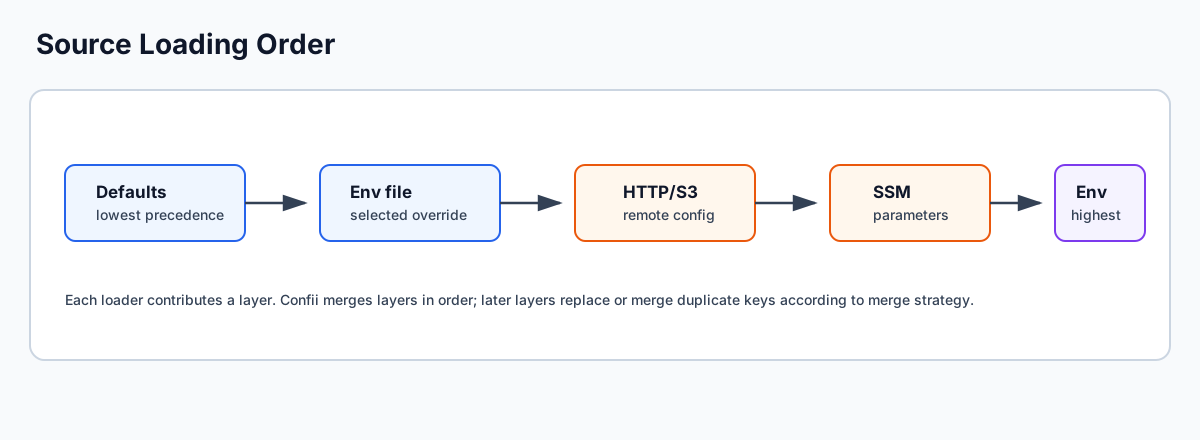
Multiple loaders may be supplied. Later loaders override earlier loaders using
deep merge.
CLI loader types use the same canonical vocabulary as self-config: use
dotenv, not env_file or envfile, and environment, not env.
Commands
init
Safely bootstrap Confii in the project root:
By default, Confii asks you to select one of three layouts:
- Separate files (recommended):
config/default.yamlplus oneconfig/{environment}.yamloverride per environment. - One sectioned file:
config/application.yamlcontainingdefaultand named environment sections. - Self-configuration only: the complete self-config without starter data.
Confii then asks whether the self-config should be YAML (recommended), JSON,
or TOML and creates .confii.yaml, .confii.json, or .confii.toml
accordingly. The generated self-config includes every supported setting, with
comments explaining its default and available choices. The generated starter
configuration is immediately loadable with confii.NewWithContext[YourConfig](ctx);
Confii does not edit go.mod or invent application source files.
Initialize another directory, creating it when necessary:
Make initialization deterministic in scripts or CI:
confii init --non-interactive \
  --strategy named-files \
  --format yaml \
  --default-environment development \
  --environments development,staging,production \
  --env-switcher APP_ENV \
  --config-dir config
Confii checks every supported hidden and visible base filename before prompting.
If one valid self-config already exists, init succeeds without changing any
file. Multiple self-configs are rejected because discovery would be ambiguous;
an invalid existing self-config is reported rather than hidden (unless
--force is deliberately being used to recover the selected self-config
format). Before a new project is written, every planned target is checked so a collision leaves no
partial initialization. A failed multi-file write is rolled back.
Preview the exact plan without creating even the target directory:
Replace the files in the selected plan only after reviewing the consequences:
--force does not delete anything outside the selected plan. If you switch
between named files and a sectioned file, inspect and remove obsolete files
yourself after verifying they are no longer used. When initializing another
directory, the success output includes the required cd step. Minimal mode
instead tells you to declare sources in .confii.yaml before running
confii plan.
| Flag | Description | Default |
|---|---|---|
--strategy |
named-files or sectioned; otherwise prompt in a terminal |
named-files when non-interactive |
--format |
Self-config format: yaml, json, or toml |
Prompt; yaml when non-interactive |
--environments |
Environment override files/sections to scaffold | development,production |
--default-environment |
Fallback environment | development |
--env-switcher |
OS variable selecting the environment | APP_ENV |
--config-dir |
Project-relative starter configuration directory | config |
--minimal |
Create only the complete self-config in the selected format | false |
--non-interactive |
Suppress layout prompting | false |
--dry-run |
Print the plan without filesystem changes | false |
-f, --force |
Replace every file in the selected plan | false |
env
Inspect the project environment without opening .confii.yaml manually:
confii env
# Environment: development
# Selected by: default_environment
# Configured default: development
# Switcher: APP_ENV (unset)
# Strategy: named_files
# Self-config: .confii.yaml
confii env current is the explicit equivalent. List every environment
discoverable from configured named files or sectioned sources:
Persist a different fallback in the project self-config:
set accepts only a currently discoverable environment by default. Use
--allow-unknown only when the matching file or section is being created in a
separate step. Writes reject non-regular self-config files, preserve file
permissions, use a same-directory atomic replacement where the platform
allows it, and leave comments and unrelated YAML/TOML settings intact.
Setting the default does not and cannot change the parent shell. If APP_ENV
or the configured env_switcher is set, that value remains effective and the
command reports the override. Use a command-scoped override when appropriate:
All inspection commands support --json. The aliases confii environment
and confii environments resolve to the same command family.
connections test
Perform a release or deployment preflight through the same configuration path as application startup:
confii connections test production --timeout 20s
confii connections test production --key database.password --json
The command overrides on_error to raise, loads every selected source, and
then resolves all leaf values (or repeatable --key selections). This proves a
real read instead of merely parsing provider settings. The report contains
only environment, loader type, key counts, configured provider aliases,
provider aliases actually exercised by selected references, effective default,
and timing. It never
prints source addresses, secret identifiers, credentials, or resolved values.
A declared secret-provider configuration with no selected ${secret:...} or
${secret@provider:...} reference fails as
unverified rather than producing a misleading success.
Failure messages are category-only (timeout, authentication, missing secret,
source read, and similar); the provider cause remains available through Go
error unwrapping but is not rendered by the CLI.
The installed standalone CLI contains core file, environment, and HTTP providers. Cloud SDKs remain opt-in. For a Vault/OpenBao or cloud preflight, reuse the command tree in a small operational binary inside the application module so its imports and build tags exactly match production:
package main

import (
    "fmt"
    "os"

    "github.com/confiify/confii-go/v2/confii/cmd"
    _ "github.com/confiify/confii-go/loader/cloud/v2"
    _ "github.com/confiify/confii-go/secret/cloud/v2"
)

func main() {
    root := cmd.NewRootCommand("application", os.Stdout, os.Stderr)
    if err := root.Execute(); err != nil {
        fmt.Fprintln(os.Stderr, err)
        os.Exit(1)
    }
}
Build and run only the providers the application uses:
go build -tags "aws,vault" -o bin/confii-app ./cmd/confii-app
bin/confii-app connections test production --timeout 20s
This keeps unused SDKs out of the core module and standalone CLI, while the
provider-enabled probe executes the exact registered loader and secret-store
implementations used at runtime. The aliases connection and connect are
available for interactive use.
| Flag | Description | Default |
|---|---|---|
-l, --loader |
Explicit core loader in type:source form |
self-config sources |
--key |
Resolve only one key; repeat for multiple keys | all keys |
--timeout |
Deadline for context-aware source loads and value reads | 15s |
--json |
Value-safe machine-readable report | false |
Provider constructors or interactive authentication flows that define their
own timeout retain that provider-specific limit; for example, Vault OIDC uses
callback_timeout_seconds from its auth configuration.
load
Load and display the merged configuration as JSON.
Examples:
# Load with environment
confii load production -l yaml:config.yaml

# Multiple sources
confii load production -l yaml:base.yaml -l yaml:prod.yaml

# No environment
confii load -l yaml:config.yaml -l env:APP
get
Retrieve a single configuration value by key path.
Examples:
# Use .confii.yaml's default_environment / env_switcher
confii get database.host

# Get a scalar value from an explicit environment
confii get database.host -e production -l yaml:config.yaml
# Output: prod-db.example.com

# Get a nested object (printed as indented JSON)
confii get database -e production -l yaml:config.yaml
# Output:
# {
#   "host": "prod-db.example.com",
#   "port": 5432
# }
validate
Validate configuration against a JSON Schema file.
Flags:
| Flag | Description | Required |
|---|---|---|
--schema |
Path to JSON Schema file; overrides .confii.yaml schema_path |
Only when schema_path is unset |
Examples:
confii validate production -l yaml:config.yaml --schema schema.json
# Output: Configuration is valid.

# Fully self-configured source, environment, and schema
confii validate

# Fails with non-zero exit code if invalid
confii validate production -l yaml:config.yaml --schema strict-schema.json
# Output: Validation failed: ...
export
Export configuration in a different format.
Flags:
| Flag | Description | Default |
|---|---|---|
-f, --format |
Output format (json, yaml) |
json |
-o, --output |
Output file path | stdout |
Examples:
# Export as JSON to stdout
confii export production -l yaml:config.yaml -f json

# Export as YAML to file
confii export production -l yaml:config.yaml -f yaml -o output.yaml

# Convert TOML to JSON
confii export -l toml:config.toml -f json -o config.json
diff
Compare two configurations (different environments or different sources).
Flags:
| Flag | Description | Default |
|---|---|---|
--loader1 |
Loaders for the first config | Required |
--loader2 |
Loaders for the second config | Same as --loader1 |
-f, --format |
Output format (unified, json) |
unified |
Examples:
# Compare two environments using the same source file
confii diff dev production --loader1 yaml:config.yaml --loader2 yaml:config.yaml

# Output:
# ~ database:
#   ~ host: localhost -> prod-db.example.com
# + monitoring.enabled = true
#
# Summary: 2 changes (1 added, 0 removed, 1 modified)

# JSON output for CI
confii diff dev production --loader1 yaml:config.yaml -f json
Same loaders for both
If --loader2 is omitted, the same loaders from --loader1 are used for both configs. The environment argument determines which env section is resolved.
debug
Show source tracking information for configuration keys.
Flags:
| Flag | Description |
|---|---|
--key |
Specific key to debug (all keys if omitted) |
--export-report |
Export full debug report as JSON file |
Examples:
# Debug a specific key
confii debug production -l yaml:base.yaml -l yaml:prod.yaml --key database.host
# Output:
# Key:       database.host
# Value:     prod-db.example.com
# Source:    prod.yaml
# Loader:    YAMLLoader
# Overrides: 1
# History:
#   1. localhost (from base.yaml via YAMLLoader)

# Debug all keys
confii debug production -l yaml:config.yaml

# Export full debug report
confii debug production -l yaml:config.yaml --export-report report.json
Debug mode is automatic
The debug command automatically enables WithDebugMode(true) for full override history tracking.
explain
Show detailed resolution information for a specific key.
Flags:
| Flag | Description | Required |
|---|---|---|
--key |
Key to explain | Yes |
Examples:
confii explain production -l yaml:config.yaml --key database.host
# Output:
# exists:            true
# key:               database.host
# value:             prod-db.example.com
# current_value:     prod-db.example.com
# source:            config.yaml
# loader_type:       YAMLLoader
# environment:       production
# override_count:    1
plan
Show the active environment strategy and the exact loader precedence plan.
When the project explicitly uses hybrid, the command also lists keys written
by both the sectioned and named-file environment models.
With no --loader flags, plan uses the project's auto-discovered
.confii.yaml sources:
confii plan production
# Environment: production
# Strategy: named_files
# Conflict policy: last_wins
#
# Load plan:
#   1. config/default.yaml [default] (8 keys)
#   2. config/production.yaml [environment] (3 keys)
#
# Mixed environment conflicts: none

confii plan production --json
If environment_conflict_policy: error rejects a hybrid configuration, the
startup error contains the conflicting keys and ordered source chain. Change
the policy only after reviewing that chain; last_wins should be a deliberate
migration choice, not a way to silence an unknown conflict.
lint
Check configuration for common issues (nil values, empty config).
Flags:
| Flag | Description |
|---|---|
--strict |
Exit with code 1 if issues are found |
Examples:
# Lint with warnings
confii lint production -l yaml:config.yaml
# Output: No issues found.

# Strict mode (for CI)
confii lint production -l yaml:config.yaml --strict
# Exits with code 1 if any issues
docs
Generate configuration documentation.
Flags:
| Flag | Description | Default |
|---|---|---|
-f, --format |
Output format (markdown, json) |
markdown |
-o, --output |
Output file path | stdout |
Examples:
# Generate markdown docs
confii docs production -l yaml:config.yaml -f markdown

# Save to file
confii docs production -l yaml:config.yaml -f markdown -o CONFIG.md

# JSON format
confii docs production -l yaml:config.yaml -f json -o config-docs.json
migrate
Migrate configuration from other tools or formats.
Flags:
| Flag | Description | Default |
|---|---|---|
-o, --output |
Output file path | stdout |
--target-format |
Target format (yaml, json, toml) |
yaml |
Supported source types: dotenv, yaml, dynaconf, hydra, and
omegaconf. yaml accepts .yaml and .yml files. Dynaconf accepts YAML,
TOML, or JSON by extension. Hydra and OmegaConf accept
standalone/materialized YAML; resolve config groups and executable custom
resolvers in the source tool before migration.
Examples:
# Migrate .env to YAML
confii migrate dotenv .env -o config.yaml

# Migrate to JSON
confii migrate dotenv .env --target-format json -o config.json

# Migrate from another YAML-based tool
confii migrate hydra config.yaml -o confii-config.yaml
Common Workflows
Inspect a config before deploying
# Load and review
confii load production -l yaml:config.yaml

# Validate against schema
confii validate production -l yaml:config.yaml --schema schema.json

# Lint for issues
confii lint production -l yaml:config.yaml --strict
Compare environments
# See what differs between dev and prod
confii diff dev production --loader1 yaml:config.yaml

# Export diff as JSON for review
confii diff dev production --loader1 yaml:config.yaml -f json > env-diff.json
Debug a specific value
# Where does this value come from?
confii explain production -l yaml:base.yaml -l yaml:prod.yaml --key database.host

# Full debug report
confii debug production -l yaml:base.yaml -l yaml:prod.yaml --export-report debug.json
Generate documentation
# Auto-generate a config reference
confii docs production -l yaml:config.yaml -f markdown -o docs/CONFIG.md