Dynamic Reloading
Confii watches configuration files on disk and automatically reloads when changes are detected, using fsnotify under the hood.
Enabling File Watching
Once enabled, Confii starts a background goroutine that watches the directories containing local source files and transitive composition includes. If a directory cannot be watched, construction fails instead of silently returning a Config with reloading disabled.
How Change Detection Works
The file watcher uses fsnotify to monitor directories (not individual files, which avoids issues with editors that perform atomic saves via rename).
- fsnotify reports a
WriteorCreateevent on a watched directory - Confii checks if the event file matches one of its tracked source files (by absolute path)
- If it matches, Confii resets the trailing-edge debounce timer
- When the debounce interval expires, one
Reloadis triggered for the burst - The reload uses incremental detection (mtime + SHA256 hash) to skip files that have not actually changed
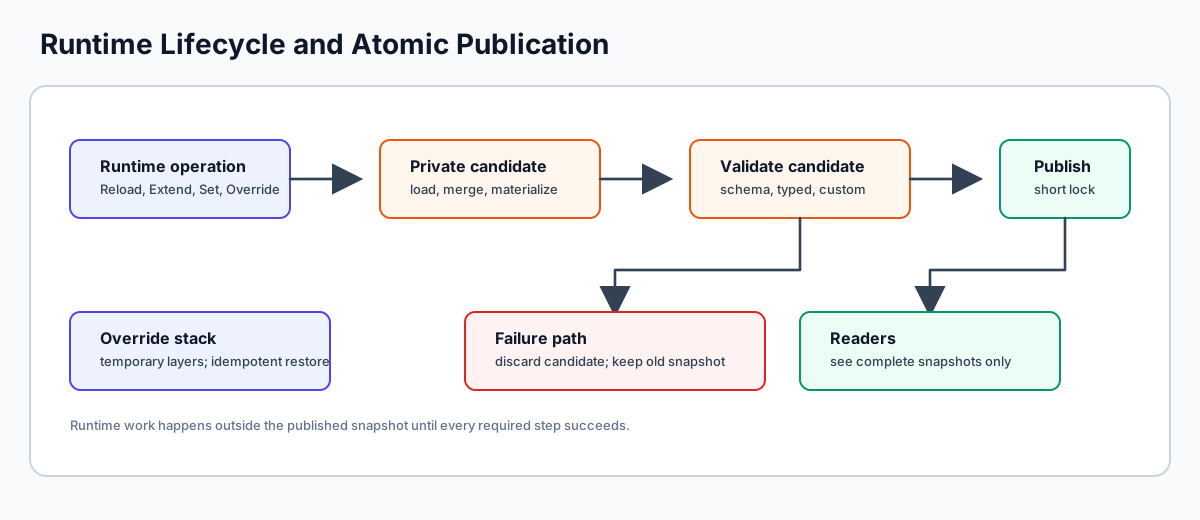
- After a successful source transaction, the watcher atomically adopts the candidate's current source and include dependency set
File edit detected
    |
    v
fsnotify event (Write/Create)
    |
    v
Is file in watched set? --No--> Ignore
    |
   Yes
    |
    v
Reset trailing-edge debounce timer
    |
    v
cfg.ReloadWithContext(ctx)
    |
    v
Incremental check (mtime + SHA256)
    |
    v
Re-merge and notify callbacks
Atomic saves and dependency changes
Write and Create events trigger reload. When an editor removes or
renames a watched file as part of an atomic save, Confii retains the
directory watch and re-arms the file when it is recreated. Included files
are first-class triggers, and successful reload/extend transactions update
the active dependency set without restarting the watcher.
Debounce contract
The default debounce is 150ms. Set reload_debounce: 0s or
WithReloadDebounce(0) for immediate watcher-driven reloads. Manual
Reload and ReloadWithContext calls are never delayed. Closing or
stopping the watcher cancels pending debounced work.
OnChange Callback Integration
Combine file watching with change callbacks to react to configuration changes in real-time:
cfg, _ := confii.NewWithContext[any](ctx,
    confii.WithLoaders(loader.NewYAML("config.yaml")),
    confii.WithDynamicReloading(true),
)

cfg.OnChange(func(key string, oldVal, newVal any) {
    log.Printf("config changed: %s = %v -> %v", key, oldVal, newVal)

    switch key {
    case "log.level":
        updateLogLevel(newVal.(string))
    case "feature_flags.new_ui":
        toggleFeature("new_ui", newVal.(bool))
    }
})
Callback safety
Panics in change callbacks are caught and logged. A panic in one callback does not prevent other callbacks from running.
StopWatching
Always stop the watcher when your application is shutting down to release file descriptors and stop the background goroutine:
Or in a graceful shutdown handler:
sigCh := make(chan os.Signal, 1)
signal.Notify(sigCh, syscall.SIGINT, syscall.SIGTERM)

go func() {
    <-sigCh
    cfg.StopWatching()
    os.Exit(0)
}()
Always stop watching
Forgetting to call StopWatching can lead to goroutine leaks and open file descriptors. Use defer or a shutdown hook.
Incremental Reload
When reload is triggered (either by the file watcher or manually), Confii fingerprints each local file with metadata and SHA-256 content hashing:
- mtime metadata -- records when the filesystem reports a source update
- SHA-256 hash -- decides whether the file content actually changed
This means:
- If you
touchor copy an identical file, the hash suppresses a false reload. - If content changes without an observable mtime tick, the hash still detects it.
- Only changed file loaders run; unchanged composed layers are reused and re-merged in their original precedence order.
- HTTP, cloud, environment, and other sources without a local fingerprint are refreshed on every incremental call so remote changes do not become permanently stale.
The file watcher calls Reload(ctx), whose default is the incremental behavior above. Pass WithIncremental(false) to force every loader to run.
Applications that manage an additional file set can use the same public tracking utility directly:
tracker := sourcetrack.NewFileTracker()
for _, path := range []string{"config.yaml", "policies.yaml"} {
    if err := tracker.Track(path); err != nil {
        return err
    }
}

changed := tracker.GetChangedFiles([]string{"config.yaml", "policies.yaml"})
GetChangedFiles preserves input order and returns only local files whose
content hash changed. Confii also uses this batch operation internally when it
selects local sources for an incremental reload.
Best Practices for Production
Use with validation
Enable WithValidateOnLoad(true) so invalid candidates are rejected before publication:
cfg, _ := confii.NewWithContext[AppConfig](ctx,
    confii.WithLoaders(loader.NewYAML("config.yaml")),
    confii.WithDynamicReloading(true),
    confii.WithValidateOnLoad(true),
)
If the new config fails validation, Confii discards the private candidate and readers continue to observe the previous snapshot.
Combine with observability
Enable metrics and events to monitor reloads in production:
Do not watch files on networked or ephemeral filesystems
fsnotify relies on OS-level filesystem events (inotify on Linux, kqueue on macOS). Network filesystems (NFS, CIFS) and container volumes may not reliably produce these events. For such environments, use a manual polling approach with cfg.ReloadWithContext(ctx) on a timer instead.
Rate limiting
Editors may produce multiple write events in quick succession (e.g., write temp file, rename). fsnotify may fire multiple events for a single save. Confii's incremental check (mtime + hash) mitigates redundant reloads at the source level.
Full Example
package main

import (
    "context"
    "fmt"
    "log"
    "os"
    "os/signal"
    "syscall"

    confii "github.com/confiify/confii-go/v2"
    "github.com/confiify/confii-go/v2/loader"
)

func main() {
    ctx := context.Background()

    cfg, err := confii.NewWithContext[any](ctx,
        confii.WithLoaders(loader.NewYAML("config.yaml")),
        confii.WithDynamicReloading(true),
        confii.WithValidateOnLoad(true),
    )
    if err != nil {
        log.Fatal(err)
    }
    defer cfg.StopWatching()

    cfg.OnChange(func(key string, oldVal, newVal any) {
        fmt.Printf("[config] %s changed: %v -> %v\n", key, oldVal, newVal)
    })

    fmt.Println("Watching for config changes. Press Ctrl+C to exit.")

    // Block until signal
    sigCh := make(chan os.Signal, 1)
    signal.Notify(sigCh, syscall.SIGINT, syscall.SIGTERM)
    <-sigCh

    fmt.Println("Shutting down.")
}