Configuration Sources
Confii loads configuration from files, environment variables, HTTP endpoints, and
cloud storage -- all through a unified Loader interface. Sources are loaded in
order: later loaders override earlier ones when deep merge is enabled.
cfg, err := confii.NewWithContext[any](ctx,
    confii.WithLoaders(
        loader.NewYAML("config/base.yaml"),       // loaded first (lowest priority)
        loader.NewJSON("config/overrides.json"),   // overrides base
        loader.NewEnvironment("APP"),              // overrides everything
    ),
)
The same core loaders can be declared in the ordered sources list:
sources:
  - type: yaml
    path: config/base.yml
  - type: dotenv
    path: .env.local
  - type: environment
    prefix: APP
Core declarative types have one canonical spelling: yaml, json, toml,
ini, dotenv, environment, and environment_files. The type selects the
parser and must agree with the path. Extensions remain conventional, so YAML
accepts .yaml and .yml, INI accepts .ini and .cfg, and dotenv accepts
.env, .env.*, and *.env. See the
canonical source-type reference.
File Loaders
Confii supports five file formats out of the box with no build tags required.
Format Syntax Worth Using
Each loader delegates syntax to a mature parser, then converts the result into Confii's configuration map. These parser features are safe to teach new developers because they are part of the supported loader path:
| Format | Best fit | Parser-backed features worth knowing | Confii-specific notes |
|---|---|---|---|
| YAML | Human-authored layered app config | Anchors, aliases, merge keys, block scalars, nested lists/maps, non-string YAML keys | Parsed with go.yaml.in/yaml/v3; keys are normalized to strings; one YAML document per source |
| JSON | Generated config, API payloads, lockstep tooling output | Strict objects, arrays, booleans, numbers, nulls | Parsed with encoding/json; numbers load as float64; no comments, trailing commas, anchors, or merge keys |
| TOML | Human-edited typed config | Tables, dotted keys, arrays, inline tables, multiline strings, date/time values | Parsed with BurntSushi/toml; integer values commonly load as int64; JSON-looking documents are rejected when TOML is declared |
| INI | Legacy/simple sectioned config | Root key/value pairs, sections, comments, simple scalar values | Parsed with gopkg.in/ini.v1; root keys are promoted to the config root; sections become nested maps |
| Dotenv | Local developer settings and secrets | export prefix, comments, single/double quotes, multiline quoted values, variable expansion |
Parsed with godotenv; dot-separated names become nested paths; scalar strings are converted when unambiguous |
Use native parser features for readability inside one file. Use Confii features
when behavior must cross source boundaries: ordered loaders for precedence,
_include for composition, _defaults for reusable defaults, merge strategies
for per-path merge behavior, and environment selection for runtime overlays.
Value References
Value references are resolved after any supported source format has been parsed, so the same syntax can appear in YAML, JSON, TOML, INI, dotenv, HTTP-loaded config, cloud-loaded config, and custom loaders. They are disabled unless the developer enables the resolver family explicitly.
| Reference | Option | Self-config | Default | Result |
|---|---|---|---|---|
${file:path} |
WithFileResolver(true) |
use_file_resolver: true |
off | Raw file contents |
${json:path#field} |
WithStructuredResolver(true) |
use_structured_resolver: true |
off | Field from a JSON file |
${yaml:path#field} |
WithStructuredResolver(true) |
use_structured_resolver: true |
off | Field from a YAML file |
${json:self#field} |
WithStructuredResolver(true) |
use_structured_resolver: true |
off | Field from the current unresolved config |
${yaml:self#field} |
WithStructuredResolver(true) |
use_structured_resolver: true |
off | Field from the current unresolved config |
${url:https://...} |
WithURLResolver(true) |
use_url_resolver: true |
off | HTTP response body text |
${cmd:command} |
WithCommandResolver(true) |
use_command_resolver: true |
off | Command stdout text |
When the reference is the entire scalar value, Confii preserves the resolved Go
type. For example, ${yaml:shared.yaml#server.port} can resolve to an integer.
When the reference is embedded inside a larger string, Confii stringifies the
resolved value and splices it into the surrounding text.
Value references run before secret resolution, so secrets inside referenced
files or referenced self fields are still resolved by ${secret:...} later in
the materialization pipeline.
URL and command references
${url:...} performs network I/O selected by configuration values.
${cmd:...} executes through the platform shell. Both are intentionally
off by default and should only be enabled for fully trusted configuration.
Formats with # comments
#field is part of the structured reference syntax. In formats where #
starts an inline comment before Confii receives the value, such as INI and
many dotenv grammars, prefer whole-document references like
${yaml:shared.yaml} or use a source format that preserves # in scalar
strings.
YAML
database:
  host: localhost
  port: 5432
  credentials:
    username: admin
    password: ${secret:db/password}
YAML sources are parsed with go.yaml.in/yaml/v3, then normalized into
Confii's map[string]any data model. Standard YAML anchors, aliases, and merge
keys therefore work inside a single YAML document:
database_defaults: &database_defaults
  port: 5432
  pool:
    min: 1
    max: 5

database:
  <<: *database_defaults
  host: dev-db.local
After parsing, Confii sees the same shape as if port and pool had been
written under database directly. Anchors are a YAML feature, so they do not
cross file boundaries and they are not available in JSON, TOML, INI, dotenv, or
environment-variable sources. Use ordered loaders, .confii.yaml sources,
_include, _defaults, and merge strategies when reuse or overrides must span
files, formats, or environments.
Block scalars are useful for short certificates, SQL, policy text, and other multi-line values:
For larger or shared file content, enable Confii's file resolver and keep the payload in a separate project file:
cfg, err := confii.New[any](
    confii.WithWorkingDir("/srv/app"),
    confii.WithFileResolver(true),
    confii.WithLoaders(loader.NewYAML("config.yaml")),
)
${file:...} includes raw file text during materialization. It runs before
secret resolution, so placeholders inside the included text are still resolved
later:
The resolver is intentionally opt-in and rooted at WithWorkingDir to avoid
letting untrusted configuration read arbitrary local files. Use _include when
you want to compose structured YAML/JSON/TOML configuration maps; use
${file:...} when the value itself should be the file contents.
JSON
JSON should be the default for generated sources because it is strict and
portable across tools. Keep two Confii details in mind: the top level must be an
object, and numbers follow Go's encoding/json behavior when decoded into
any, so they load as float64.
TOML
TOML is a good fit when humans want a typed, less indentation-sensitive format:
server.port = 8080
server.tags = ["api", "internal"]

[database]
host = "localhost"
pool = { min = 1, max = 10 }

[[workers]]
name = "importer"
enabled = true
Dotted keys and tables both produce nested maps. Arrays and inline tables are
preserved as structured values, and integers commonly load as int64 through
the TOML parser.
INI
Keys before the first section are promoted to the config root, while each section becomes a nested map:
INI values are strings at the file level, then Confii converts unambiguous booleans, integers, and floats. Prefer INI for simple legacy configuration, not deep object graphs.
.env (Dotenv)
Dotenv parsing follows godotenv's quoting, comment, export, multiline, and
variable-expansion grammar. Confii then converts unambiguous scalar values and
maps dot-separated names such as database.host into nested configuration.
Malformed records follow WithEnvFileErrorPolicy; warning logs identify the
source and line without logging the record's potentially sensitive content.
Inside any string value, the default env-expander hook supports both ${NAME}
and the explicit ${env:NAME} form.
export APP_NAME=confii
database.host=localhost
database.port=5432
LOG_LINE="first line
second line"
API_URL="https://${API_HOST}/v1"
Use dotenv for local environment-like input. If you need list or object syntax, prefer YAML, JSON, or TOML and keep dotenv for final local overrides.
Combining file formats
A project may combine source formats. A common pattern uses YAML for the main
config, JSON for machine-generated overrides, and .env for local secrets:
Environment Variables
The EnvironmentLoader reads OS environment variables matching a prefix and maps
them into nested configuration keys.
How Variables Map to Keys
Given prefix APP, the loader:
- Filters variables starting with
APP_ - Strips the
APP_prefix - Splits on the separator (default
__) to create nested keys - Lowercases all key parts
| Environment Variable | Config Key | Value |
|---|---|---|
APP_DEBUG |
debug |
true |
APP_SERVER__HOST |
server.host |
"0.0.0.0" |
APP_SERVER__PORT |
server.port |
8080 |
APP_DATABASE__MAX_CONNECTIONS |
database.max_connections |
100 |
Scalar type parsing
Values are automatically parsed: "true" becomes bool, "8080" becomes
int, "3.14" becomes float64. Unparseable values stay as strings.
Custom Separator
The default nesting separator is __ (double underscore). Override it with
WithSeparator:
With WithSeparator("_"), APP_DATABASE_HOST maps to database.host.
Single underscore separator
Using _ as the separator means you cannot have keys with underscores in
their names. Prefer the default __ unless you have a specific reason to
change it.
Using WithEnvPrefix
confii.WithEnvPrefix is shorthand for explicitly adding
an EnvironmentLoader:
// These are equivalent:
confii.WithLoaders(loader.NewEnvironment("APP"))
// vs
confii.WithEnvPrefix("APP")
Full Example
HTTP Loader
Load configuration from any HTTP or HTTPS endpoint. The response body is
auto-detected as JSON or YAML based on the Content-Type header.
import "github.com/confiify/confii-go/v2/loader"

l := loader.NewHTTP("https://config.example.com/api/v1/config")
Options
| Option | Description | Default |
|---|---|---|
loader.WithTimeout(d) |
HTTP request timeout | 30s |
loader.WithHTTPClient(client) |
Copy a custom client, transport, redirect policy, and cookie jar | standard client |
loader.WithMaxResponseBytes(n) |
Maximum accepted response body size | 8 MiB |
loader.WithHeaders(map) |
Custom request headers | none |
loader.WithBasicAuth(user, pass) |
HTTP Basic Authentication | none |
Examples
Content-Type detection
The HTTP loader inspects the Content-Type response header to determine the
format. If the header is missing or ambiguous, it falls back to parsing the
URL extension (.json, .yaml, .yml, .toml). JSON and YAML are
attempted in order if no format can be determined.
Bounded responses
The loader rejects bodies larger than 8 MiB before parsing. Increase the limit explicitly only for a trusted endpoint whose configuration document is expected to be larger.
Cloud Loaders
Cloud loaders live in the opt-in loader/cloud module, keeping the core module
small. Provider SDK loaders are additionally selected by build tags. The Git
loader is the exception: it belongs to loader/cloud but requires no build
tag.
Cloud loaders may also be declared in .confii.yaml when the containing
application or operational CLI blank-imports loader/cloud. The source
registry is context-aware and uses the same constructors shown below:
sources:
  - type: s3
    url: s3://my-bucket/config/production.yaml
    region: us-east-1
  - type: ssm
    path: /myapp/production/
    decrypt: true
| Type | Required fields | Optional fields |
|---|---|---|
git |
repository, file_path |
branch, token |
s3 |
url |
region, access_key, secret_key, endpoint, path_style |
ssm |
path |
region, decrypt, access_key, secret_key, endpoint |
azure_blob |
container_url, blob |
connection_string, or account_name with account_key/sas_token |
gcs |
bucket, object |
project_id, credentials_file |
ibm_cos |
bucket, object |
region, endpoint |
Prefer each provider's default credential chain or environment variables over
literal credentials in a committed self-config file. Use
confii connections test from a provider-enabled operational binary to prove
that authentication and reads work without displaying loaded values.
Build Tags Overview
| Build Tag | Enabled Loaders | SDK |
|---|---|---|
aws |
S3, SSM Parameter Store | aws-sdk-go-v2 |
azure |
Azure Blob Storage | azure-sdk-for-go |
gcp |
Google Cloud Storage | cloud.google.com/go |
ibm |
IBM Cloud Object Storage | IBM COS SDK |
# Enable specific providers
go build -tags aws
go build -tags "aws,gcp"

# Enable all cloud providers
go build -tags "aws,azure,gcp,ibm"
Build tags are required
Without the appropriate provider build tag, the S3, SSM, Azure, GCS, and
IBM constructors are not available at compile time. The Git constructor is
available whenever the loader/cloud module is installed.
Git Loader (No Build Tag Required)
The Git loader fetches configuration from a file in a GitHub or GitLab
repository via raw content URLs. Install
github.com/confiify/confii-go/loader/cloud/v2 first; it does not require any
build tag. Repository URLs must use HTTPS and the exact public host
github.com or gitlab.com; embedded credentials, custom ports, query
strings, fragments, and traversal segments are rejected before a private
repository token is attached to the provider-specific raw endpoint.
import "github.com/confiify/confii-go/loader/cloud/v2"

l := cloud.NewGit(
    "https://github.com/myorg/config-repo",
    "services/my-app/config.yaml",
)
Git Options
| Option | Description | Default |
|---|---|---|
cloud.WithGitBranch(branch) |
Branch to read from | "main" |
cloud.WithGitToken(token) |
Access token for private repos | $GIT_TOKEN env var |
l := cloud.NewGit(
    "https://github.com/myorg/config-repo",
    "config.yaml",
    cloud.WithGitBranch("release/v2"),
    cloud.WithGitToken(os.Getenv("GITHUB_TOKEN")),
)
AWS S3
Loads a config file from an S3 bucket. Requires build tag aws.
//go:build aws

import "github.com/confiify/confii-go/loader/cloud/v2"

l, err := cloud.NewS3("s3://my-bucket/config/app.yaml")
S3 Options
| Option | Description | Default |
|---|---|---|
cloud.WithS3Region(region) |
AWS region | auto-detected |
cloud.WithS3Credentials(access, secret) |
Explicit credentials | default credential chain |
l, err := cloud.NewS3("s3://my-bucket/config/app.yaml",
    cloud.WithS3Region("us-west-2"),
    cloud.WithS3Credentials(
        os.Getenv("AWS_ACCESS_KEY_ID"),
        os.Getenv("AWS_SECRET_ACCESS_KEY"),
    ),
)
S3 URL format
The S3 URL follows the standard s3://bucket-name/key/path format.
The file format is auto-detected from the key's extension.
AWS SSM Parameter Store
Loads configuration from AWS Systems Manager Parameter Store by path prefix.
All parameters under the prefix are read and organized into a nested map.
Requires build tag aws.
//go:build aws

import "github.com/confiify/confii-go/loader/cloud/v2"

l := cloud.NewSSM("/myapp/production/")
SSM Options
| Option | Description | Default |
|---|---|---|
cloud.WithSSMDecrypt(bool) |
Decrypt SecureString parameters | true |
cloud.WithSSMRegion(region) |
AWS region | auto-detected |
cloud.WithSSMCredentials(access, secret) |
Explicit credentials | default credential chain |
l := cloud.NewSSM("/myapp/production/",
    cloud.WithSSMRegion("eu-west-1"),
    cloud.WithSSMDecrypt(true),
)
SSM key mapping
A parameter at /myapp/production/database/host with prefix
/myapp/production/ becomes the key database.host in your config.
Azure Blob Storage
Loads a config file from Azure Blob Storage. Requires build tag azure.
//go:build azure

import "github.com/confiify/confii-go/loader/cloud/v2"

l := cloud.NewAzureBlob(
    "https://myaccount.blob.core.windows.net/configs",
    "app/config.yaml",
)
Azure Blob Options
| Option | Description |
|---|---|
cloud.WithAzureAccountKey(name, key) |
Authenticate with account name and key |
cloud.WithAzureSASToken(name, token) |
Authenticate with a SAS token |
cloud.WithAzureConnectionString(conn) |
Authenticate with a full connection string |
l := cloud.NewAzureBlob(
    "https://myaccount.blob.core.windows.net/configs",
    "app/config.yaml",
    cloud.WithAzureAccountKey("myaccount", os.Getenv("AZURE_STORAGE_KEY")),
)
Azure authentication
If no explicit credentials are provided, the loader falls back to
azidentity.NewDefaultAzureCredential(), which supports managed identity,
Azure CLI, and other standard methods.
Google Cloud Storage
Loads a config file from a GCS bucket. Requires build tag gcp.
//go:build gcp

import "github.com/confiify/confii-go/loader/cloud/v2"

l := cloud.NewGCS("my-bucket", "config/app.yaml")
GCS Options
| Option | Description | Default |
|---|---|---|
cloud.WithGCSProject(id) |
Quota/billing project used with ADC (option.WithQuotaProject) |
GCP_PROJECT_ID or unset |
cloud.WithGCSCredentials(path) |
Path to service account key file | ADC |
l := cloud.NewGCS("my-bucket", "config/app.yaml",
    cloud.WithGCSProject("my-project-123"),
    cloud.WithGCSCredentials("/etc/secrets/sa-key.json"),
)
IBM Cloud Object Storage
Loads a config file from IBM COS. Requires build tag ibm.
//go:build ibm

import "github.com/confiify/confii-go/loader/cloud/v2"

l := cloud.NewIBMCOS(/* ... */)
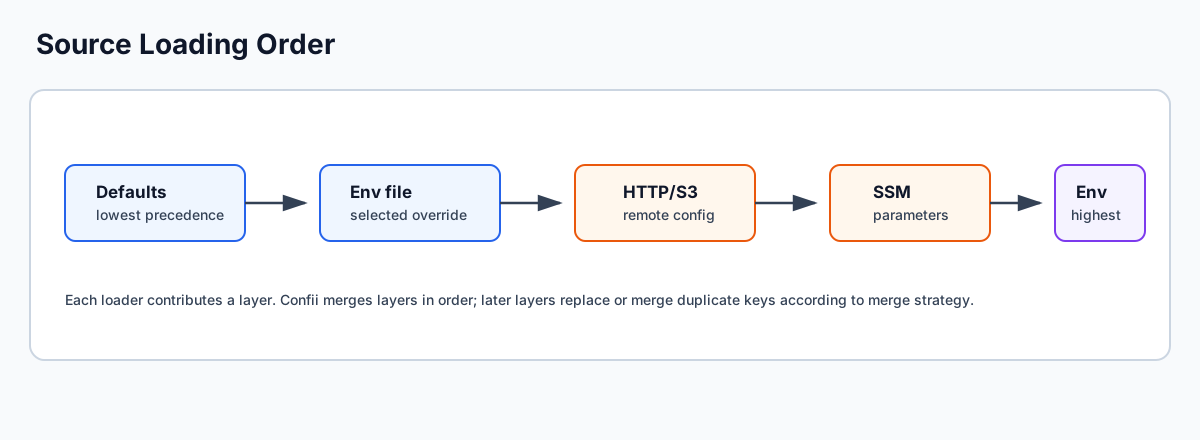
Multi-Source Loading Order
When multiple loaders are configured, they are processed in order. Each subsequent loader's data is merged on top of the previous result.
cfg, err := confii.NewWithContext[any](ctx,
    confii.WithLoaders(
        loader.NewYAML("config/base.yaml"),       // 1. Base config
        loader.NewYAML("config/prod.yaml"),        // 2. Env-specific overrides
        loader.NewEnvFile(".env"),                  // 3. Local dotenv
        loader.NewEnvironment("APP"),              // 4. Environment variables (highest)
    ),
    confii.WithEnv("production"),
)
The effective merge order is:
Deep merge is the default
With WithMergeStrategy(confii.StrategyMerge) (the default), nested maps are merged recursively.
A later source only needs to specify the keys it wants to override -- all
other keys from earlier sources are preserved.
Override Behavior
Result:
Shallow merge replaces entire sections
With WithMergeStrategy(confii.StrategyShallowMerge), a later source that defines database will
replace the entire database map from earlier sources. Only use shallow
merge if you understand this behavior and want full section replacement.
Recommended Loading Order
A common pattern for production applications:
confii.WithLoaders(
    loader.NewYAML("config/defaults.yaml"),    // 1. Shared defaults
    loader.NewYAML("config/" + env + ".yaml"), // 2. Environment-specific
    loader.NewEnvFile(".env"),                  // 3. Local overrides (gitignored)
    loader.NewEnvironment("APP"),              // 4. Runtime overrides (12-factor)
)
| Layer | Purpose | Committed to Git? |
|---|---|---|
defaults.yaml |
Sane defaults for all environments | Yes |
production.yaml |
Production-specific values | Yes |
.env |
Developer-local overrides | No (gitignored) |
APP_* env vars |
CI/CD and runtime overrides | N/A |
Runtime Source Extension
New sources may be added after initialization without a full reload:
The extended source is merged on top of the existing configuration using the same merge strategy.
Custom Loaders
Implement the Loader interface to provide a custom source:
Loadreturns the configuration as amap[string]any, or(nil, nil)if the source does not exist (graceful absence).Sourcereturns a human-readable identifier (e.g., file path, URL).
Example: Redis Loader
type RedisLoader struct {
    client *redis.Client
    key    string
}

func (l *RedisLoader) Load(ctx context.Context) (map[string]any, error) {
    data, err := l.client.Get(ctx, l.key).Bytes()
    if err == redis.Nil {
        return nil, nil // graceful absence
    }
    if err != nil {
        return nil, err
    }

    var result map[string]any
    if err := json.Unmarshal(data, &result); err != nil {
        return nil, err
    }
    return result, nil
}

func (l *RedisLoader) Source() string {
    return "redis:" + l.key
}
cfg, err := confii.NewWithContext[any](ctx,
    confii.WithLoaders(
        loader.NewYAML("config.yaml"),
        &RedisLoader{client: rdb, key: "app:config"},
    ),
)
Graceful absence
Return (nil, nil) from Load when the source simply doesn't exist (e.g.,
an optional file or a missing Redis key). Return (nil, error) for actual
failures (network errors, parse errors). The error policy (WithOnError)
only applies to actual errors, not graceful absence.