Quick Start
This guide starts with an empty directory and ends with a typed Go application
whose configuration changes by environment. It uses confii init, so the files
you create here are the same structure Confii recommends for a real project.
Prerequisites
- Go 1.25 or newer
- A shell where
$(go env GOPATH)/binis onPATH
1. Create a Go project
Use your real module path instead of example.com/my-service when the project
already has a repository.
2. Install the library and CLI
Add Confii to this application's module and install the confii executable:
go get github.com/confiify/confii-go/v2@latest
go install github.com/confiify/confii-go/v2/confii@latest
confii --version
go get updates this project's go.mod; go install places the CLI in
$(go env GOPATH)/bin. If confii is not found, add that directory to PATH.
For reproducible application builds, commit go.mod and go.sum and update the
library version deliberately.
3. Initialize Confii
Run the guided initializer:
It asks how you want to organize environments and whether the self-config should use YAML (recommended), JSON, or TOML:
- Separate files (recommended) — shared values in
config/default.yaml, with small overrides such asconfig/development.yamlandconfig/production.yaml. - One sectioned file —
config/application.yamlcontainsdefault,development, andproductionsections. - Self-configuration only — create only the selected self-config format without starter data.
The rest of this guide uses the recommended separate-file layout. To produce it without a prompt, including a staging environment, run:
confii init --non-interactive \
  --strategy named-files \
  --format yaml \
  --environments development,staging,production
Confii creates:
my-service/
├── .confii.yaml
└── config/
    ├── default.yaml
    ├── development.yaml
    ├── staging.yaml
    └── production.yaml
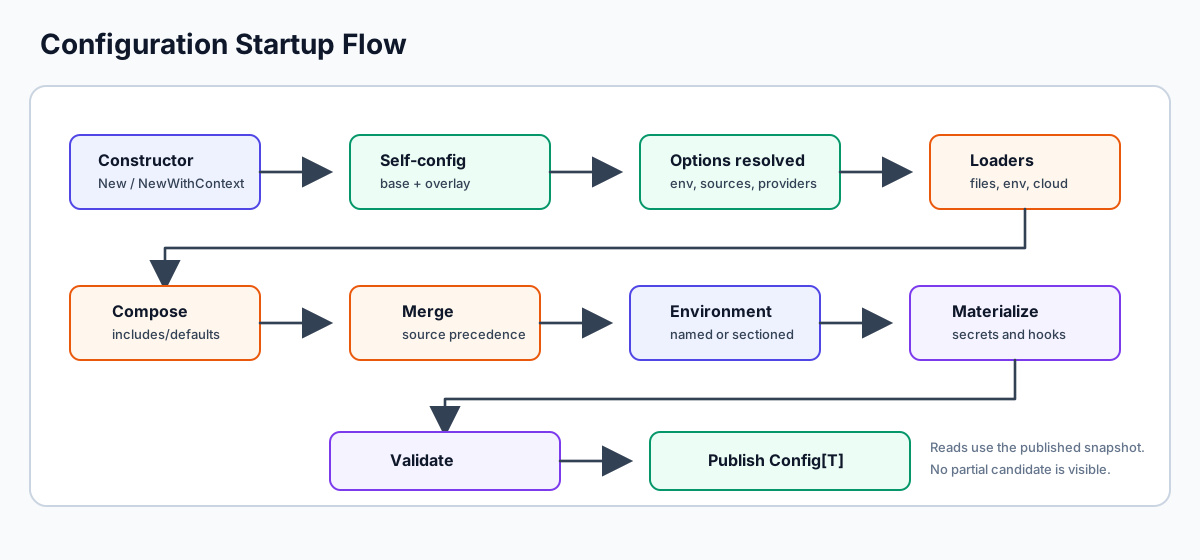
The .confii.<format> file is the project's control plane. It selects the active environment,
declares the files to load, and exposes every supported startup decision as a
documented setting. The generated file is ready to use; the active fragment is:
default_environment: "development"
env_switcher: "APP_ENV"
environment_strategy: named_files

sources:
  - type: environment_files
    search_paths: ["config"]
    default_file: default.yaml
    environment_file: "{environment}.yaml"
    default_required: true
    environment_required: true
The generated data demonstrates layering. config/default.yaml supplies values
for every environment, and the selected named file overrides only what differs:
Safe to rerun
confii init detects an existing project and changes nothing. Use
--dry-run to preview a plan. Use --force only when you intentionally
want to replace every file in that plan; the command preflights targets and
rolls back a failed multi-file write. It never deletes files from an older
layout, so review obsolete configuration files manually after changing
strategies.
To override Confii's own behavior by environment, add a same-family,
same-format overlay such as .confii.production.yaml. Confii loads the base
first and recursively overlays the file selected by APP_ENV (or the configured
fallback environment). It rejects mixed hidden/visible families and mixed
formats instead of guessing precedence.
4. Inspect and select the environment
First confirm which environment is effective and which choices were generated:
To change the project fallback, use confii env set production. This safely
updates default_environment in .confii.yaml. To clear the fallback, use
confii env reset. A shell value still has higher precedence, so
APP_ENV=production confii env reports production without modifying the
project file.
Before writing application code, ask the CLI what Confii will load:
The production plan contains two ordered layers:
Inspect the fully merged result with:
These commands use the same .confii.yaml discovery and environment selection
as the Go application.
5. Load typed configuration in Go
Create main.go:
package main

import (
    "fmt"
    "log"

    confii "github.com/confiify/confii-go/v2"
)

type AppConfig struct {
    App struct {
        Name string `confii:"name"`
    } `confii:"app"`
    Server struct {
        Host string `confii:"host"`
        Port int    `confii:"port"`
    } `confii:"server"`
    Log struct {
        Level string `confii:"level"`
    } `confii:"log"`
}

func main() {
    cfg, err := confii.New[AppConfig]()
    if err != nil {
        log.Fatal(err)
    }

    values, err := cfg.Typed()
    if err != nil {
        log.Fatal(err)
    }

    fmt.Printf("app=%s address=%s:%d log=%s\n",
        values.App.Name,
        values.Server.Host,
        values.Server.Port,
        values.Log.Level,
    )
}
There are no loader paths or environment names in the Go code. confii.New
uses an implicit startup context with a 60-second safety deadline. Use
confii.NewWithContext[AppConfig](ctx) only when initialization should inherit a
caller's cancellation, values, or deadline.
discovers .confii.yaml, and explicit confii.With* options remain available
when an application must override a project default.
6. Run different environments
With no selector, the generated default_environment is development:
Select production through the generated env_switcher:
For runtime value overrides, set a distinct prefix in .confii.yaml:
Then use double underscores for nested keys:
APP_ENV chooses the configuration environment; MYAPP_* overrides individual
values. Keeping those namespaces separate avoids treating the selector itself
as application configuration.
Choosing the other layout
If your team prefers one file, initialize with:
Confii generates config/application.yaml with default, development, and
production sections. The Go integration remains exactly
confii.NewWithContext[AppConfig](ctx). Pick one environment model for normal operation;
the explicit hybrid strategy is intended for controlled migrations, not as a
default project structure.
Next steps
| Goal | Continue with |
|---|---|
Understand every .confii.yaml setting and precedence |
Configuration |
| Learn environment selection and both file layouts | Environment Resolution |
| Use YAML, JSON, environment, HTTP, Git, or cloud sources | Configuration Sources |
| Validate typed values or JSON Schema | Validation |
| Resolve Vault, OpenBao, or cloud secrets | Secret Management |
| Trace where a value came from | Introspection |
| Use every CLI command | CLI Tool |
| Run focused feature samples | Examples |
| Explore a realistic CRUD, LocalStack, and Vault/OpenBao application | Companion examples repository |