Environment Resolution
Confii supports two deliberate environment models:
- Named files (recommended for new projects): load shared values from
config/default.yaml, then overlayconfig/<environment>.yaml. - Sectioned file: keep
default,development,production, and other environment sections in one file and resolve the selected section at load time.
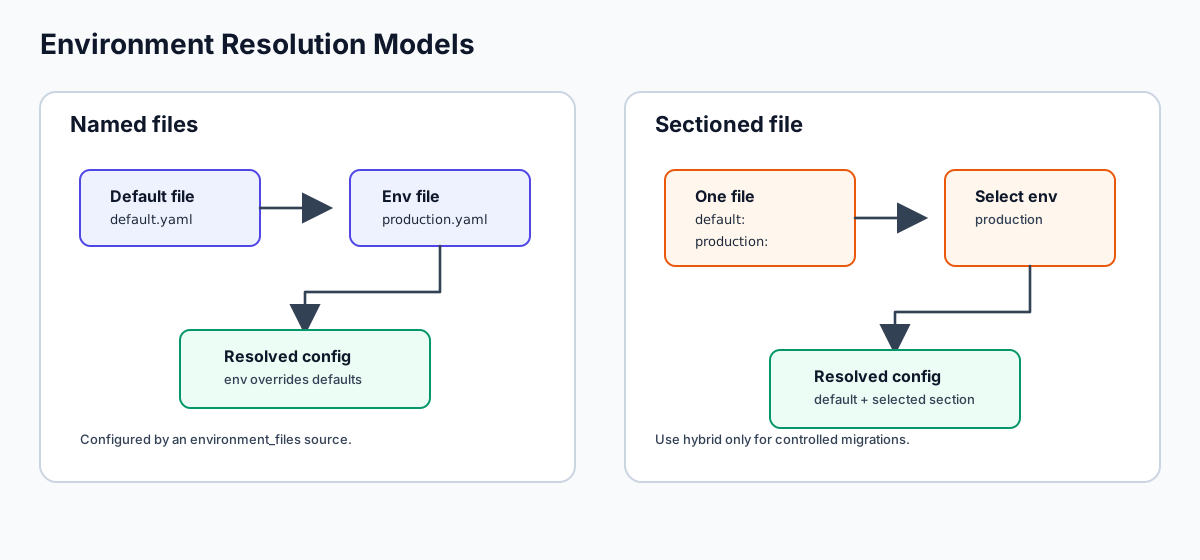
Run confii init to choose either layout and generate matching self-config.
Do not combine both models in normal operation; Confii rejects accidental
mixing unless a controlled migration explicitly selects hybrid.
Which Model Should I Choose?
| Situation | Recommended model |
|---|---|
| New service with deployment environments | Named files |
| Small app or demo with one compact file | Sectioned file |
| Migrating existing mixed layouts | Temporary hybrid with explicit conflict policy |
| Tenant-specific overlays | Named files plus runtime Extend or an explicit tenant loader |
| Container chooses runtime environment | env_switcher such as APP_ENV |
| Local developer fallback | default_environment |
Environment names are literal. production selects production.yaml;
prod selects prod.yaml. Confii does not alias prod to production or
dev to development.
Inspect the resolved selection and the available environments at any time:
How Sectioned Files Work
When you set an active environment (e.g., "production"), Confii's envhandler.Handler performs a three-step resolution:
- Extract the
defaultsection as the base configuration. - Extract the active environment section (e.g.,
production). - Deep-merge the environment section on top of
default, so environment-specific values override defaults while inheriting everything else.
default:             production:           resolved (env=production):
  database:            database:             database:
    host: localhost      host: prod-db         host: prod-db       <-- overridden
    port: 5432                                 port: 5432          <-- inherited
    pool_size: 5                               pool_size: 5        <-- inherited
  debug: true          debug: false           debug: false          <-- overridden
Sectioned File Structure
A typical environment-aware config file contains a default key and one or more environment keys at the top level:
default:
  app:
    name: my-service
    log_level: info
  database:
    host: localhost
    port: 5432
    pool_size: 5
    ssl: false
  cache:
    driver: memory
    ttl: 300

development:
  app:
    log_level: debug
  database:
    host: localhost

staging:
  database:
    host: staging-db.internal
    ssl: true
  cache:
    driver: redis
    url: redis://staging-cache:6379

production:
  app:
    log_level: warn
  database:
    host: prod-db.example.com
    pool_size: 20
    ssl: true
  cache:
    driver: redis
    url: redis://prod-cache.example.com:6379
    ttl: 3600
Top-level keys are environment names
Any top-level key whose value is a map is treated as a potential environment section. Confii does not restrict which environment names you use -- default, production, staging, development, testing, qa, or any custom name all work.
Setting the Active Environment
WithEnv() -- Explicit Environment
Set the environment directly in code. This is the most common approach for applications that know their environment at startup:
cfg, err := confii.NewWithContext[any](ctx,
    confii.WithLoaders(loader.NewYAML("config.yaml")),
    confii.WithEnv("production"),
)

// Resolved values:
host, _ := cfg.Get("database.host")    // "prod-db.example.com"
port := cfg.GetIntOr("database.port", 0) // 5432 (inherited from default)
ssl, _ := cfg.GetBool("database.ssl")  // true (overridden by production)
WithEnvSwitcher() -- From OS Environment Variable
Read the environment name from an OS environment variable at runtime. This is ideal for container deployments where the environment is injected:
cfg, err := confii.NewWithContext[any](ctx,
    confii.WithLoaders(loader.NewYAML("config.yaml")),
    confii.WithEnvSwitcher("APP_ENV"),  // reads os.Getenv("APP_ENV")
)
Priority: WithEnv() wins over WithEnvSwitcher()
If both WithEnv() and WithEnvSwitcher() are set, the WithEnvSwitcher() value only applies when WithEnv() was not explicitly set. The resolution order is: explicit WithEnv() > WithEnvSwitcher() OS variable > self-config file default_environment > empty string.
Self-Config File
A .confii.yaml file may define the default environment:
This applies with the lowest priority -- any explicit code option overrides it.
The CLI can safely change this project fallback without editing unrelated self-config settings:
confii env set does not mutate the calling shell. A non-empty value in the
configured env_switcher still wins, and the command says so. For a temporary
selection, prefix the application or Confii command instead:
Applications can obtain the same sorted inventory through
cfg.AvailableEnvironments(). Sectioned environments are discovered from
loaded top-level mappings; named environments are discovered from regular
files matching each environment_files template and search path. The shared
default layer is deliberately excluded.
Separate Files Per Environment
The initializer's recommended layout configures this model automatically:
To configure it manually, declare config/default.yaml plus
config/<environment>.yaml in .confii.yaml:
default_environment: development
env_switcher: APP_ENV
environment_strategy: named_files
sources:
  - type: environment_files
    search_paths: [config, .]
    default_file: default.yaml
    environment_file: "{environment}.yaml"
For APP_ENV=production, Confii loads config/default.yaml first and
config/production.yaml second. Each role uses the first match in
search_paths, so a root-level file is only used when the corresponding file
is absent from config/. Set default_required or environment_required to
control missing-file failures; their defaults are false and true,
respectively.
Declaring environment_files infers the named_files strategy. Flat sources
remain composable, but a source containing
top-level environment sections is rejected so a project cannot accidentally
activate two environment models. Use environment_strategy: hybrid together
with an explicit environment_conflict_policy only for a deliberate migration
or integration, and inspect it with confii plan <environment>.
Inheritance Behavior
Environment resolution uses deep merge, meaning:
- Scalar values in the environment section replace the default.
- Nested maps are recursively merged -- environment-specific keys override, but missing keys are inherited from
default. - Lists are replaced entirely (not appended).
Lists are replaced, not merged
When an environment section provides a list value, it replaces the entire list from default. If you need list merging behavior, use merge strategies with Append or Prepend.
What Happens When an Environment Is Not Found
If the requested environment does not exist as a top-level key in the config:
- Confii logs a warning with the requested environment name and the list of available environments.
- The resolved config falls back to the
defaultsection only. - No error is returned -- the application continues with defaults.
cfg, err := confii.NewWithContext[any](ctx,
    confii.WithLoaders(loader.NewYAML("config.yaml")),
    confii.WithEnv("canary"),  // not defined in config.yaml
)
// Warning: "environment not found in config, using defaults"
//          env="canary", available=["development", "staging", "production"]

// All values come from the "default" section:
host, _ := cfg.Get("database.host")  // "localhost"
No default section and no matching environment
If the config has neither a default key nor the requested environment key, Confii treats it as a flat (non-environment-structured) config and returns the entire map as-is. This lets you use the same API for both environment-aware and simple flat configs.
Complete Example with Multiple Environments
package main

import (
    "context"
    "fmt"
    "os"

    "github.com/confiify/confii-go/v2"
    "github.com/confiify/confii-go/v2/loader"
)

func main() {
    ctx := context.Background()

    // Determine environment from APP_ENV, default to "development"
    env := os.Getenv("APP_ENV")
    if env == "" {
        env = "development"
    }

    cfg, err := confii.NewWithContext[any](ctx,
        confii.WithLoaders(loader.NewYAML("config.yaml")),
        confii.WithEnv(env),
    )
    if err != nil {
        panic(err)
    }

    fmt.Printf("Environment: %s\n", cfg.Env())
    fmt.Printf("Database host: %s\n", cfg.GetStringOr("database.host", "unknown"))
    fmt.Printf("Database port: %d\n", cfg.GetIntOr("database.port", 5432))
    fmt.Printf("Database SSL: %v\n", cfg.GetBoolOr("database.ssl", false))
    fmt.Printf("Cache driver: %s\n", cfg.GetStringOr("cache.driver", "memory"))
    fmt.Printf("Log level: %s\n", cfg.GetStringOr("app.log_level", "info"))
}
default:
  app:
    log_level: info
  database:
    host: localhost
    port: 5432
    ssl: false
  cache:
    driver: memory

development:
  app:
    log_level: debug

staging:
  database:
    host: staging-db.internal
    ssl: true
  cache:
    driver: redis

production:
  app:
    log_level: warn
  database:
    host: prod-db.example.com
    ssl: true
  cache:
    driver: redis
Running with different environments:
APP_ENV=development go run .
# Database host: localhost, SSL: false, Log level: debug

APP_ENV=staging go run .
# Database host: staging-db.internal, SSL: true, Log level: info

APP_ENV=production go run .
# Database host: prod-db.example.com, SSL: true, Log level: warn
Combining with Multiple Loaders
Environment resolution happens after all loaders are merged. Multiple configuration files and environment-variable sources can therefore contribute to the final result before environment-section extraction:
cfg, err := confii.NewWithContext[any](ctx,
    confii.WithLoaders(
        loader.NewYAML("base.yaml"),        // base config with default/production sections
        loader.NewYAML("overrides.yaml"),    // additional overrides (also with sections)
        loader.NewEnvironment("APP"),        // env vars override everything
    ),
    confii.WithEnv("production"),
)
The processing pipeline is:
- Load
base.yaml,overrides.yaml, and environment variables. - Deep-merge them in order (later loaders override earlier ones).
- Extract
default+productionfrom the merged result. - Deep-merge
productionon top ofdefault. - Return the resolved config.